

SEO content publishing is the process of preparing, publishing and monitoring web content so search engines can find, understand and rank it. It covers the work between “my draft is finished” and “my page is live, indexed and being measured.” This guide gives you a three-phase workflow and a checklist you can reuse for every post.
It’s written for small business owners, bloggers, students, startup teams and marketers who can write but aren’t sure what to do after the draft is done.
What Is SEO Content Publishing?
SEO content publishing is the full process of taking finished content live in a way that helps search engines discover, understand and rank it. It goes beyond writing. It includes:
- Choosing a topic that matches what searchers want
- Structuring and formatting the page
- Setting titles, descriptions, URLs and internal links
- Checking that the page can be indexed
- Requesting indexing, distributing the content and tracking results
- Updating the page over time
SEO writing vs SEO content publishing. SEO writing creates the content. SEO content publishing gets that content live, findable and measured. A strong article can underperform if it’s published with a noindex tag, no internal links or a missing title tag. These are publishing problems, not writing problems.
For more information about SEO, read Google’s SEO Starter Guide
Why Publishing Matters?
Many beginners publish a post, share it once and wait. Several things can quietly go wrong:
- The page can’t be indexed because of a leftover no index tag from a staging site.
- No other page links to it, so search engines and readers can’t easily find it.
- The title and description don’t reflect what the page offers.
- Nobody checks whether the page gets impressions or clicks.
The SEO Content Publishing Workflow at a Glance
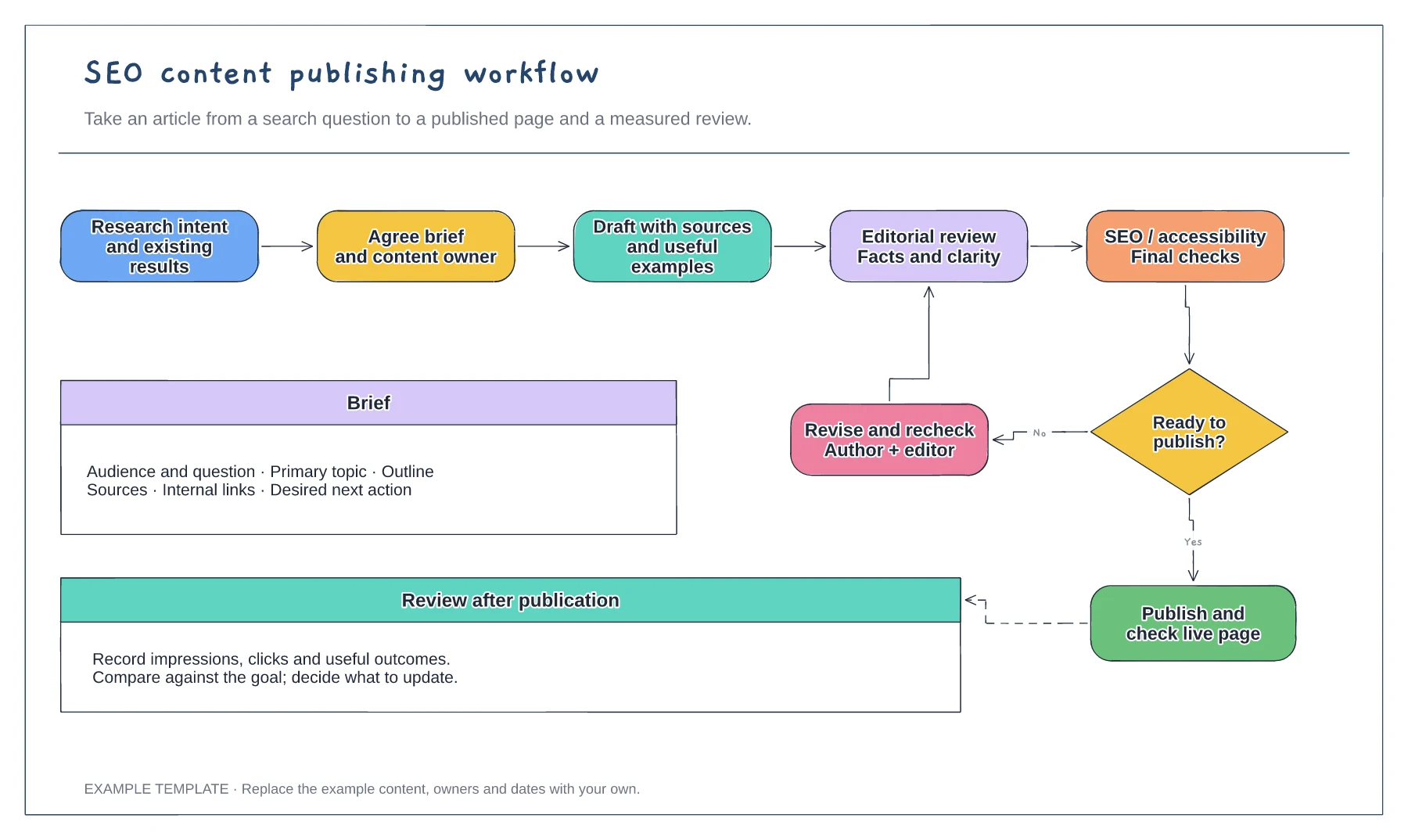
| Phase | Goal | Key steps |
|---|---|---|
| 1. Before you publish | Make sure the page deserves to rank | Check intent, structure content, verify facts, plan links, prepare images |
| 2. Publishing setup | Make the page readable by people and search engines | Title, meta description, URL, headings, links, schema, indexing controls, speed |
| 3. After you publish | Get it found, measured and improved | Request indexing, sitemap, distribute, track, refresh |
Phase 1: Before You Publish
Step 1: Confirm search intent
Search intent is the reason behind a search. Before you publish, search your main keyword on Google and look at what ranks. Ask:
- Are the top results guides, product pages, lists or videos?
- What questions do they answer?
- What do they leave out?
If the top results are all product pages and you’ve written a guide, you may be targeting the wrong keyword or format. Adjust before you publish.
Choose one primary keyword per page, plus a few related phrases that fit naturally. Don’t repeat keywords to hit a count. Clear, complete writing matters more.
Step 2: Structure the content for readers and search engines
- One H1 that says what the page is about
- H2s and H3s that follow a logical order and reflect real questions
- Short paragraphs of two to four sentences
- A direct answer near the top of the page or section
- Lists and tables where they make comparison or steps clearer
- A table of contents on longer posts
Searchers skim. Descriptive headings help them and help search engines understand the page.
Step 3: Check quality and originality
Google’s guidance emphasizes helpful, people-first content that shows experience, expertise, authoritativeness and trust (E-E-A-T). Before publishing:
- Verify every fact and link to the source where you can.
- Add real experience: your own screenshots, examples, mistakes and results. Only include results you actually have.
- Name the author and add a short bio with relevant background.
- Add a date and update it when you revise the page.
- Read it as a beginner. Would someone new to the topic understand it?
If you use AI tools for drafting, review and fact-check the output. You’re responsible for what you publish.
Step 4: Plan your links
- Internal links: link to related pages on your site, and plan which existing pages should link to the new one.
- External links: link to reliable sources such as official documentation, where they support a claim.
Use descriptive anchor text such as “on-page SEO checklist” instead of “click here.”
Step 5: Prepare images
- Compress images so pages load quickly.
- Use descriptive file names, such as
seo-publishing-workflow.pnginstead ofIMG_4821.png. - Write short alt text that describes the image for people who can’t see it.
- Use real screenshots when you’re explaining a tool or process.
Phase 2: Publishing Setup (On-Page and Technical)
| Element | What to do |
|---|---|
| Title tag | Describe the page clearly and put the main topic near the start. Keep it concise, since long titles get truncated in results. |
| Meta description | Write a short summary that would make someone want to click. Google may rewrite it, but a good one is still worth writing. |
| H1 | Match the page's purpose. It can differ slightly from the title tag. |
| URL | Short, readable and lowercase, with hyphens between words. Avoid dates and unnecessary words. |
Headings, readability and formatting
Check that headings follow a logical hierarchy and aren’t used only for styling. Read the page on your phone. Most Indian users browse on mobile, so text should be readable without zooming.
Internal links
Add links from the new page to relevant pages, and add links from existing related pages to the new one. A page with no internal links pointing to it is called an orphan page, and it’s harder for search engines to discover.
Schema markup
Structured data (schema) helps search engines understand a page’s content. For a blog post, basic Article markup with author and date is a reasonable starting point. Many CMS SEO plugins add it automatically.
Google has limited the rich results it shows for some types, including FAQ and HowTo, so don’t add schema expecting a specific visual result. Check Google’s structured data documentation for what’s currently supported.
Indexing controls
Before you hit publish, check:
- Noindex tag: make sure it’s not set. This is common after staging or “discourage search engines” settings.
- Canonical tag: it should point to the correct version of the page.
- robots.txt: confirm it doesn’t block the page.
- XML sitemap: confirm the page will be included.
Mobile and page speed
Google measures user experience through Core Web Vitals, which cover loading, interactivity and visual stability. You don’t need to master them as a beginner. Test the page in PageSpeed Insights, fix obvious problems such as oversized images, and retest.
Publishing on a CMS
On WordPress, Wix, Shopify or similar platforms, SEO settings are usually in the page editor or an SEO plugin. Look for fields for the title, meta description, URL slug, canonical and indexing. The names differ by platform, but the checks are the same.
Phase 3: After You Publish
Step 1: Request indexing
In Google Search Console, paste the page URL into the URL Inspection tool. If the page isn’t indexed, you can request indexing. A request doesn’t guarantee indexing or ranking. Google decides based on quality and other factors.
Step 2: Check your sitemap
Confirm the new page appears in your XML sitemap and that the sitemap is submitted in Search Console. Bing Webmaster Tools offers similar tools if you want visibility in Bing.
Step 3: Distribute the content
Search traffic takes time. In the meantime:
- Share the post on social channels relevant to your audience.
- Send it to your email list.
- Share it in communities where it’s genuinely useful and where the rules allow it.
- If you run a local business, consider a Google Business Profile post.
Step 4: Track performance
Use these two free tools:
- Google Search Console: impressions, clicks, average position and the queries that show your page.
- Google Analytics 4: visits, engagement and conversions on your site.
Don’t judge results after a few days. Ranking timelines vary widely with your site’s history, competition and content quality. No one can promise a specific timeline.
Step 5: Update and refresh
Set a review date, for example three to six months after publishing. Then:
- Check Search Console for queries the page nearly answers.
- Fix outdated facts and broken links.
- Add missing sections or FAQs.
- Update the “last updated” date only when you’ve made real changes.
SEO Content Publishing for AI Search (AEO and GEO Basics)
Search now includes AI-generated answers, such as Google’s AI Overviews and chat-based tools. Answer Engine Optimization (AEO) and Generative Engine Optimization (GEO) describe making content easy for these systems to understand and reference. No one can guarantee that your page will be cited, but these habits help:
- Answer questions directly. Put a clear 40 to 60 word answer under a question-style heading, then expand.
- Define terms clearly. Say what something is in plain language.
- Use consistent names for tools, concepts and your own brand.
- Cite reliable sources and show who wrote the page.
- Keep it fresh. Show update dates and review the page regularly.
- Add original value: your own examples, screenshots and process notes. Pages that only repeat what everyone says give AI systems little reason to prefer them
SEO Content Publishing Tips for an Indian Audience
- Design mobile-first. Test on a phone and on slower connections.
- Consider regional languages. If your audience searches in Hindi or another language, check that there’s real demand before investing, and use native-quality writing rather than raw machine translation.
- Use local context. Use ₹ for prices, Indian examples and local terms your audience actually uses.
- Do local SEO if you serve a location. Claim and complete your Google Business Profile, and keep your name, address and phone number consistent across the web.
- Handle data responsibly. If your site collects emails or form data, have a clear privacy policy and consent language. India’s Digital Personal Data Protection Act, 2023 sets obligations for handling personal data, so consult a legal professional about what applies to you.
Common SEO Content Publishing Mistakes
| Mistake | Why it hurts | Fix |
|---|---|---|
| Leaving noindex on | The page can't appear in search | Check indexing settings before and after publishing |
| Publishing without checking intent | Your format may not match what searchers want | Review the top results first |
| Duplicate titles and descriptions | Pages look identical in search | Write unique ones for each page |
| Orphan pages | Hard to discover and signals low importance | Add internal links from related pages |
| No tracking set up | You can't tell what works | Connect Search Console and GA4 |
| Never updating | Content goes stale | Schedule reviews |
| Copying others' structure | Adds nothing new | Add your own examples and insight |
Free Tools for SEO Content Publishing
| Tool | Use | Cost |
|---|---|---|
| Google Search Console | Indexing, queries, sitemaps, performance | Free |
| Google Analytics 4 | Traffic and conversions | Free |
| Bing Webmaster Tools | Bing indexing and performance | Free |
| PageSpeed Insights | Page speed and Core Web Vitals | Free |
| Your CMS's SEO plugin or settings | Titles, descriptions, sitemaps, schema | Varies |
Frequently Asked Questions
1. What is SEO content publishing?
SEO content publishing is the process of preparing, publishing and monitoring content so search engines can find, understand and rank it. It covers pre-publish checks, on-page and technical setup, indexing requests, distribution and performance tracking.
2. What's the difference between SEO writing and SEO content publishing?
SEO writing is creating the content. SEO content publishing covers everything from the finished draft to a live, indexed and tracked page, including metadata, links, technical checks and updates.
3. What should I check before publishing a blog post for SEO?
Check that the content matches search intent, the facts are verified, headings are clear, the title and description are written, images are compressed with alt text, internal links are planned and the page isn’t set to noindex.
4. How do I get a new blog post indexed on Google?
Make sure the page is crawlable and in your sitemap, link to it from other pages, then use the URL Inspection tool in Google Search Console to request indexing. Google doesn’t guarantee indexing.
5. How long does SEO content take to rank?
It varies with your site’s authority, competition and content quality. Some pages are indexed within days, while ranking can take weeks or months. No one can promise a fixed timeline.
6. Do I need an SEO plugin?
Not strictly. Many CMS platforms have built-in fields for titles, descriptions and URLs. A plugin can make sitemaps, canonicals and schema easier to manage, but the underlying checks are the same.
7. How often should I publish SEO content?
It depends on your resources and goals. A steady schedule you can maintain with good quality usually beats frequent low-quality posts. Start with a pace you can sustain.
8. Should I update old posts or publish new ones?
Both matter. If an existing page already gets impressions but is outdated or incomplete, updating it is often worthwhile. New posts make sense for topics you haven’t covered.
9. Does SEO publishing work for Hindi or regional-language content?
Yes, the same principles apply: match intent, structure well, check indexing and track results. Check search demand first and write natively rather than relying on raw translation.
10. Can AI tools help with SEO content publishing, and what should I check manually?
AI tools can help with outlines, drafts and metadata suggestions. Manually check facts, originality, tone, source accuracy and whether the page adds real value. Publishing unreviewed AI output is risky.